
You have 0 items in your cart
Key Takeaways
- Most ATS time losses happen between the stages, not during sourcing or screening. The admin steps that run on recruiter time instead of system logic are where the hours disappear
- A consistent process underneath the automation matters more than the features. Underperforming ATS setups are rarely missing tools. They’re missing structure
- Intake, parsing, and screening should be configured first because they affect every application and produce the fastest volume relief
- Scheduling and candidate communication are where pipeline movement stalls. Automating both removes the manual coordination that slows progression between stages
- Process metrics tell you whether automation is working. Cycle time and completion rates are more reliable indicators than placement volume alone
Ask a recruiter where their time goes, and you’ll hear about sourcing, screening, and interviews. Ask their applicant tracking system data the same question, and the answer is usually different. The admin steps between stages, the ones that should be automated but aren’t, account for more lost time than most teams realize until they measure it. What’s missing in most underperforming setups isn’t features. It’s a consistent process underneath them.
This guide covers 9 ATS workflow automations that reduce admin time, with what to configure at each stage and what to measure.
Where ATS workflow automation saves the most time
Most recruiting bottlenecks come from slow handoffs, inconsistent stages, and manual steps that run on recruiter time instead of system logic.
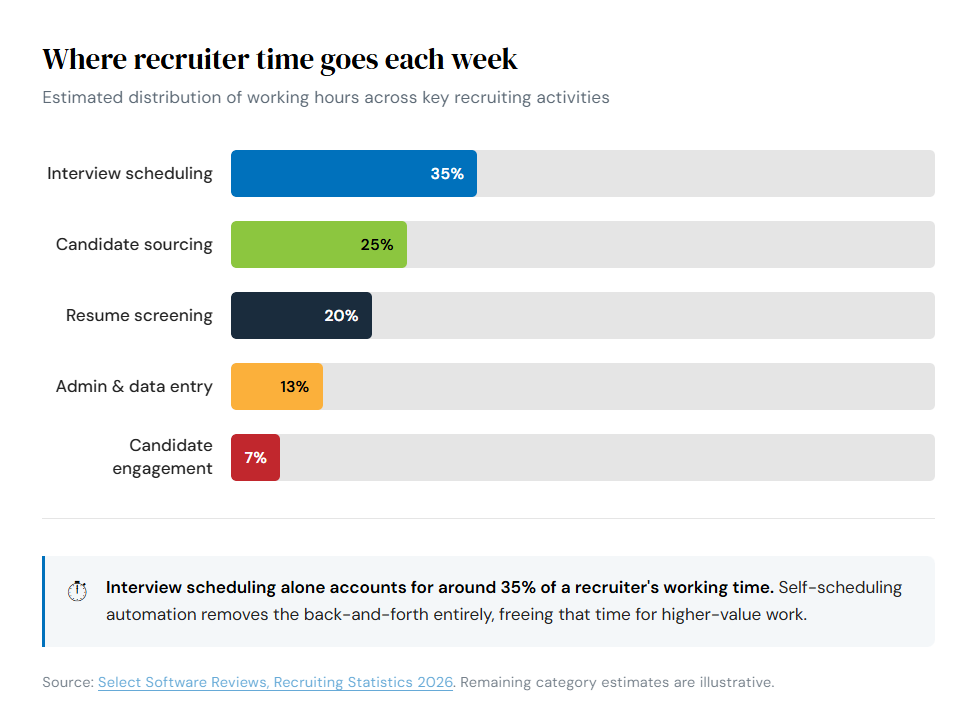
An ATS for recruitment workflow works best when stages have triggered actions attached, so the process moves without someone pushing it along.
1. One-click job distribution and automatic intake routing
Posting a job shouldn’t require logging into multiple platforms. With automated job distribution, a single submission pushes the listing to connected job boards, social media channels, and your career site at once. Routing rules then direct incoming applications straight to the right job, recruiter, and intake stage via the recruiting lifecycle. Track time from job approval to first qualified application review to confirm intake is running on the system, not on a person.
- Require consistent application fields from the start. Every submission enters the pipeline in a usable state, not a format that needs cleaning before anyone can act on it
- Configure routing rules by role category, location, or hiring team. Incoming applications land in the right queue without a recruiter manually redirecting them
2. Resume parsing and structured profiles that reduce data entry
Every minute spent copying contact details or work history from a CV into a candidate record is a minute not spent recruiting. Resume parsing extracts that information automatically and maps it into structured fields, turning documents into searchable candidate profiles without manual input. Profile completeness rate is the metric to watch.
- Map parsed fields to your standard profile structure. Incoming data lands in the right place rather than accumulating in free-form notes that no one searches
- Configure duplicate detection at the point of entry. The same candidate won’t appear twice and break automation sequences downstream
3. Screening automation with knockout questions and filters
Not every applicant is a fit, and reviewing ineligible applications takes time that compounds quickly at volume. Knockout questions and pre-screening filters move disqualified applications out of the review queue before a recruiter sees them, keeping the focus on candidates who meet the baseline criteria. The percentage of applicants reaching active recruiter review is the clearest signal that screening logic is calibrated correctly.
- Define knockout criteria for requirements that are genuinely non-negotiable (location, certifications, right to work). Disqualification becomes automatic rather than a judgment call made inconsistently across reviewers
- Build auto-progress and auto-decline rules based on screening responses. Qualified candidates move forward immediately rather than waiting in a queue for manual review
Intake automation fails in predictable ways. Too many workflow stages create friction without adding decisions. Weak routing rules send applications to a default queue that no one owns. Duplicate records break automation sequences before a candidate reaches their first review.
4. Candidate matching and shortlist workflows
Matching shifts from manual search to automated comparison when your ATS scores applicants against the criteria tied to an open role. Strong matches surface at the top of the review queue, and recruiters confirm or adjust the shortlist rather than building it from scratch. Track time to a confirmed shortlist.
- Set matching criteria that reflect the real requirements of each role, not just keywords. The ranking produces a usable shortlist rather than one that needs to be rebuilt manually
- Configure alerts for new high-match applicants. Strong candidates get reviewed promptly rather than sitting in an unchecked queue
5. Interview scheduling automation that removes back-and-forth
According to recruiting industry research, interview scheduling accounts for around 35% of a recruiter’s working time. Self-scheduling tools change that: candidates pick from pre-set availability windows, confirmations go out automatically, and calendar blocks are created without a single email exchange. Track scheduling cycle time from interview request to confirmed slot.
- Define interview types and assign appropriate time blocks per stage. Calendar logic stays accurate before candidates ever see the booking link
- Configure confirmation and reminder sequences. No-shows drop without the recruiter manually chasing attendance
6. Automated candidate communication and stage updates
Status-chase emails from candidates signal gaps in the communication workflow, not engaged candidates. Triggered messages tied to stage changes (application acknowledgment, screening outcome, next steps after interview) keep candidates informed without the recruiter drafting each one manually. Track time to first response after application.
- Build templates for each key stage (acknowledgment, screening, interview invite, rejection, offer). Every candidate gets a consistent message regardless of which recruiter owns the role
- Tie message triggers to stage movements. Updates are sent automatically, without depending on someone remembering to follow up
Movement slows in consistent patterns. Stage ownership that’s unassigned leaves candidates waiting with no one accountable for the next action. Template sprawl, where every recruiter has a slightly different version of the same message, creates inconsistency and maintenance overhead. Communication gaps that go unnoticed for 48 hours trigger candidate drop-off.
7. Collaboration and feedback that speed decisions
Chasing hiring managers for feedback is one of the most consistent causes of delayed decisions. Good ATS workflow management means attaching stage ownership and required feedback gates to the process itself. Track feedback turnaround time from interview completion to decision.
- Use structured scorecards. Feedback stays standardized across reviewers rather than free-form notes that can’t be compared or acted on quickly
- Assign task ownership by stage. It’s always clear who acts next, and the system surfaces overdue actions before they create delays
8. Talent pooling and rediscovery for repeat roles
High-volume and recurring roles don’t need to start from scratch every time. A well-maintained talent pool, built from past applicants, silver medalists, and previously placed candidates, gives recruiters a qualified starting point before a role is posted publicly. Time to a qualified shortlist for a repeat role is the clearest measure of whether the talent pool is actually usable.
- Build tagging rules that flag strong near-miss candidates at the point of rejection. They’re captured in the pool when the decision is made, not rediscovered months later
- Segment talent pools by skill set, availability, or engagement level. Outreach reaches candidates who are actually reachable, not a broad, unfiltered list
9. Integrations and reporting that remove admin work
Manual reporting and cross-platform data entry are where recruiter time quietly disappears. Integrating your applicant tracking system with the tools your team already uses (email, calendar, job boards, assessment platforms) removes duplicate entry. An ATS with customizable workflow stages makes scheduled reports more reliable. Bottlenecks surface before they become delays. For a breakdown of which numbers to prioritize, this post on recruitment KPIs is a practical starting point.
- Define your ATS as the single source of truth for candidate and job data. Reports pull from one place rather than requiring manual reconciliation across systems
- Schedule recurring reports for the metrics that matter most to leadership. Visibility becomes automatic, not dependent on someone running a query
Delayed feedback loops hold up decisions and skew time-to-hire figures. Integrations that were set up correctly but never maintained silently corrupt data when a connected platform updates. Inconsistent stage use, where recruiters move candidates differently, makes pipeline reports meaningless.
What to automate first
Setting up ten automations inconsistently wastes more time than configuring three well. Start with the steps that affect every job and every candidate. IBM’s research on recruitment automation shows companies using automation report up to 30% faster time-to-hire, but that depends on consistent setup, not just switching features on.
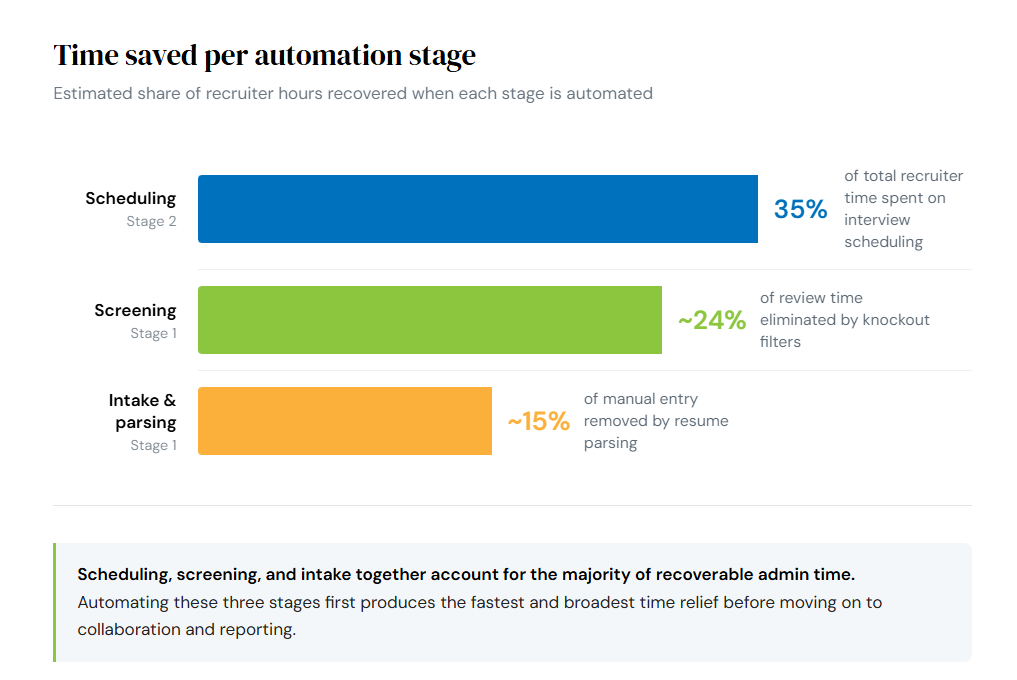
A practical rollout order:
- Intake, parsing, and screening: Fix the top of the funnel first. These affect every application and produce immediate volume relief.
- Scheduling and stage updates: Once candidates move through consistently, remove the manual coordination steps that slow progression.
- Collaboration, integrations, and reporting: With the core workflow running, connect surrounding systems and build the visibility to see where time is still being lost.
Validate each phase with process metrics, not output metrics. Cycle time and completion rates tell you whether the automation is working.
Streamline ATS workflow automation with Tracker
When evaluating ATS recruitment software, the question isn’t which features are available. It’s whether they connect into a workflow your team will actually use consistently. Tracker is a combined ATS and CRM built for recruitment and staffing teams that need structured, automated workflows across the full hiring process, not just individual point tools.
- Job boards and sourcing: post to 1,000+ job boards with one click, with Watchdogs running automated candidate sourcing and matching in the background
- Automation: build customized email, text, and workflow sequences that trigger automatically across candidates, clients, and placements
- Recruitment ATS and CRM: manage applicant tracking, shortlisting, candidate matching, and interview management inside one connected system
- TrackerAI: generate screening questions, rank candidates, summarize resumes, and draft outreach without leaving the platform
- Remote collaboration: run video interviews, collect structured scorecard feedback, and share candidate progress with clients through the client portal
- Reporting and dashboards: track KPIs, build custom lifecycle reports, and schedule automated delivery so hiring performance is always visible
Closing thought: make ATS workflow time savings repeatable
Automation saves time when the process underneath it is consistent. That means defined stages, clear ownership at each step, and handoffs that happen automatically rather than manually. The teams that see sustained time savings aren’t running more automations. They’re running fewer, better-configured ones.
See how Tracker’s ATS and CRM automation reduces admin handoffs across the full workflow. Request a demo.

