Staffing Back Office Software: Timesheets, Invoicing & Payroll Data
Tracker’s back office software runs timesheets, expenses, and invoicing on one platform, and feeds clean data to your payroll provider. Every figure reconciles in real time, against the actual data, so the numbers you quote at the front match the numbers you bill at the back.
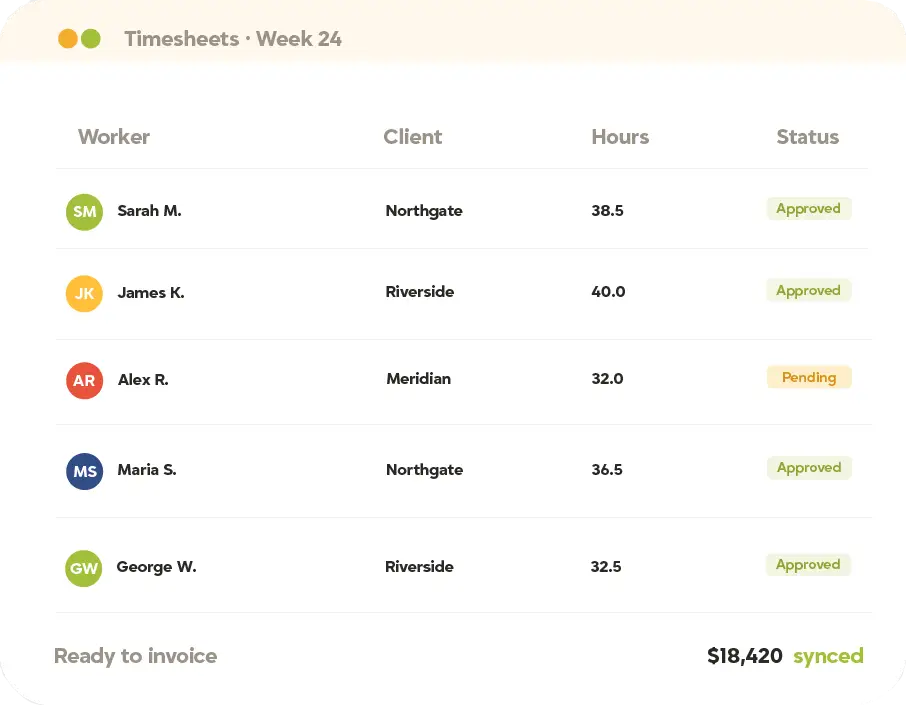
Two-way sync with the tools you already run






How Back Office Software Works
Three systems is two too many
Timesheets, expenses, invoices, it takes serious effort to make these run, and more to make them run accurately. When every piece lives in a different platform, every handoff is a place the numbers stop matching. With Tracker’s back office software, everything runs on one platform, and intelligence connects each part to every other, so timesheets feed invoicing and your payroll provider, and every figure reconciles automatically against the actual data.
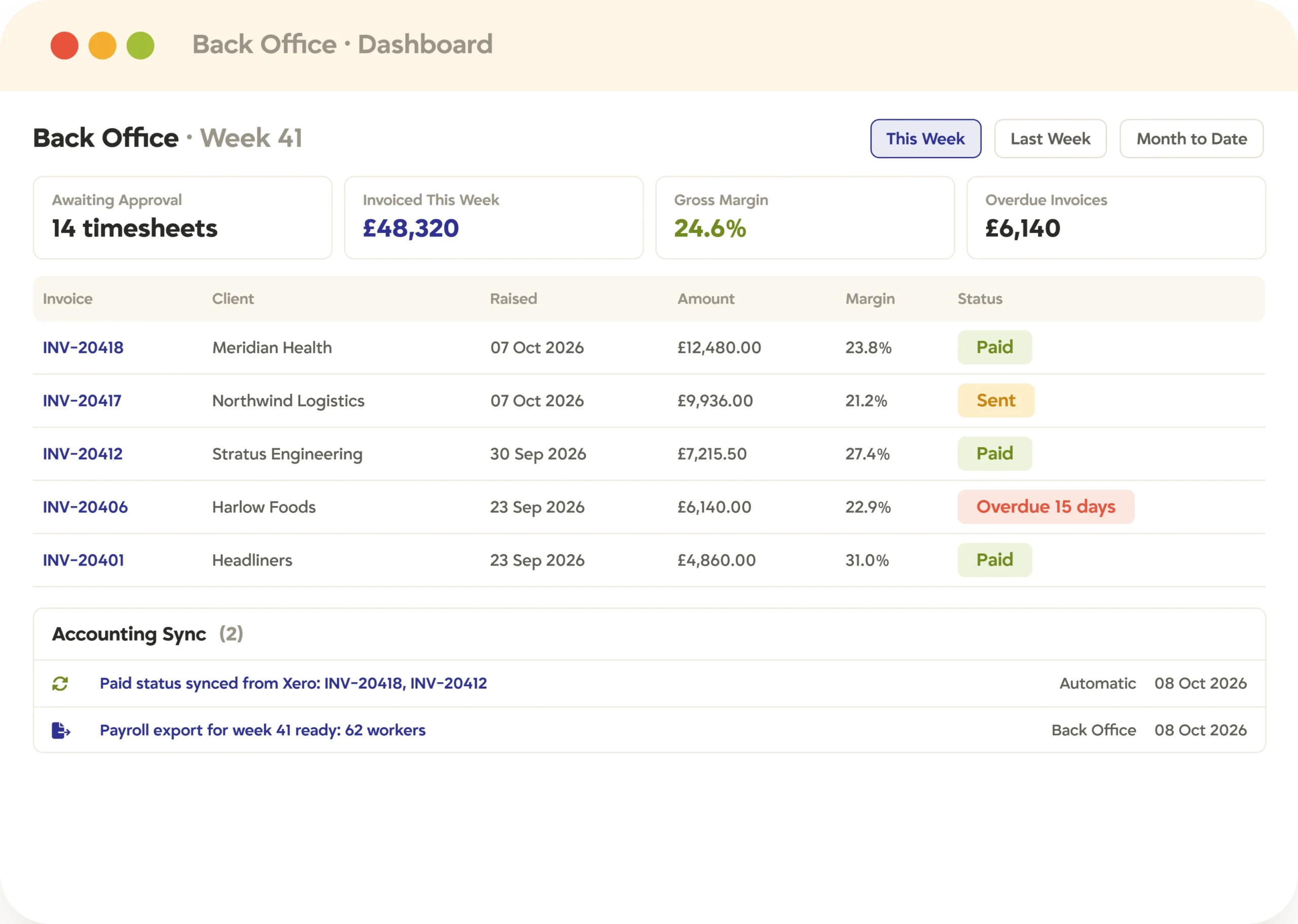
Back Office · Invoicing · Accounting sync
Timesheets, invoicing, expenses, and payroll data. One solution.
Every part of the operation on one record, so nothing has to be re-entered, reconciled, or chased between systems.
Timesheets route for one-click client sign-off, then your team’s approval. The team approves instead of chasing.
Rate cards apply by client, shift, and worker type. No rate ever reaches the invoice wrong.
Invoices raise and payroll data exports from one page. Approved today, billed today.
Two-way sync with QuickBooks, Sage, and Xero. Paid status flows back on its own.
Margin, invoice aging, outstanding payments. In plain sight before anyone has to ask.
Matters most to Operations & finance
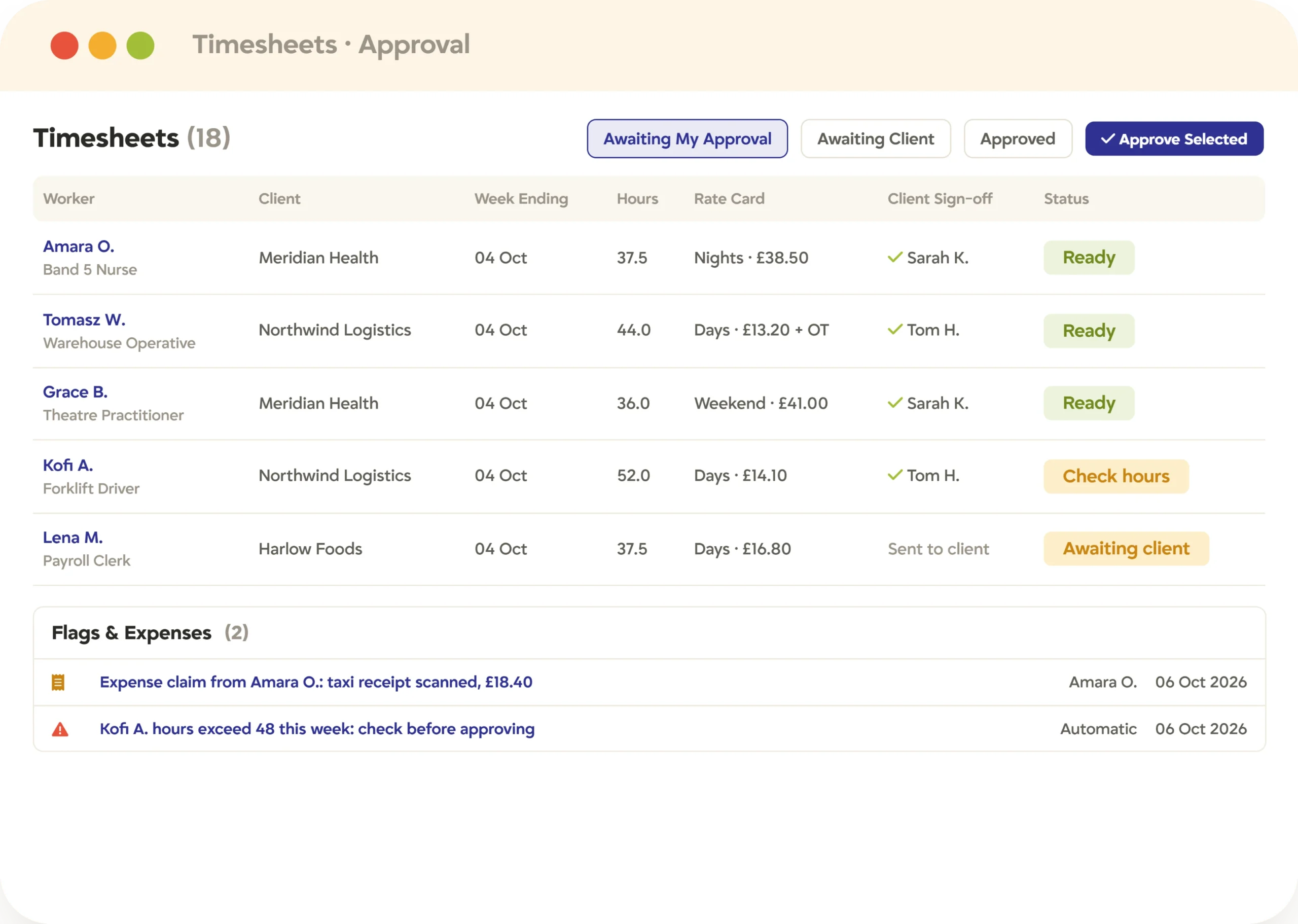
Automated Timesheets & Expense Management
The pay run, without the Thursday scramble
The pay run stops depending on someone chasing submissions every week. The platform does the work.
Workers self-submit from any device. Nobody chases a timesheet on Thursday.
The right rate card applies as hours come in. Caught before the invoice, not after it.
Client sign-off is one click, no login or account. Then your team gives the final approval.
A photo of a receipt is the whole expense claim. The details enter themselves.
Bureau and umbrella connections feed your provider. The right data, the right way, every run.
Matters most to Back-office teams & finance
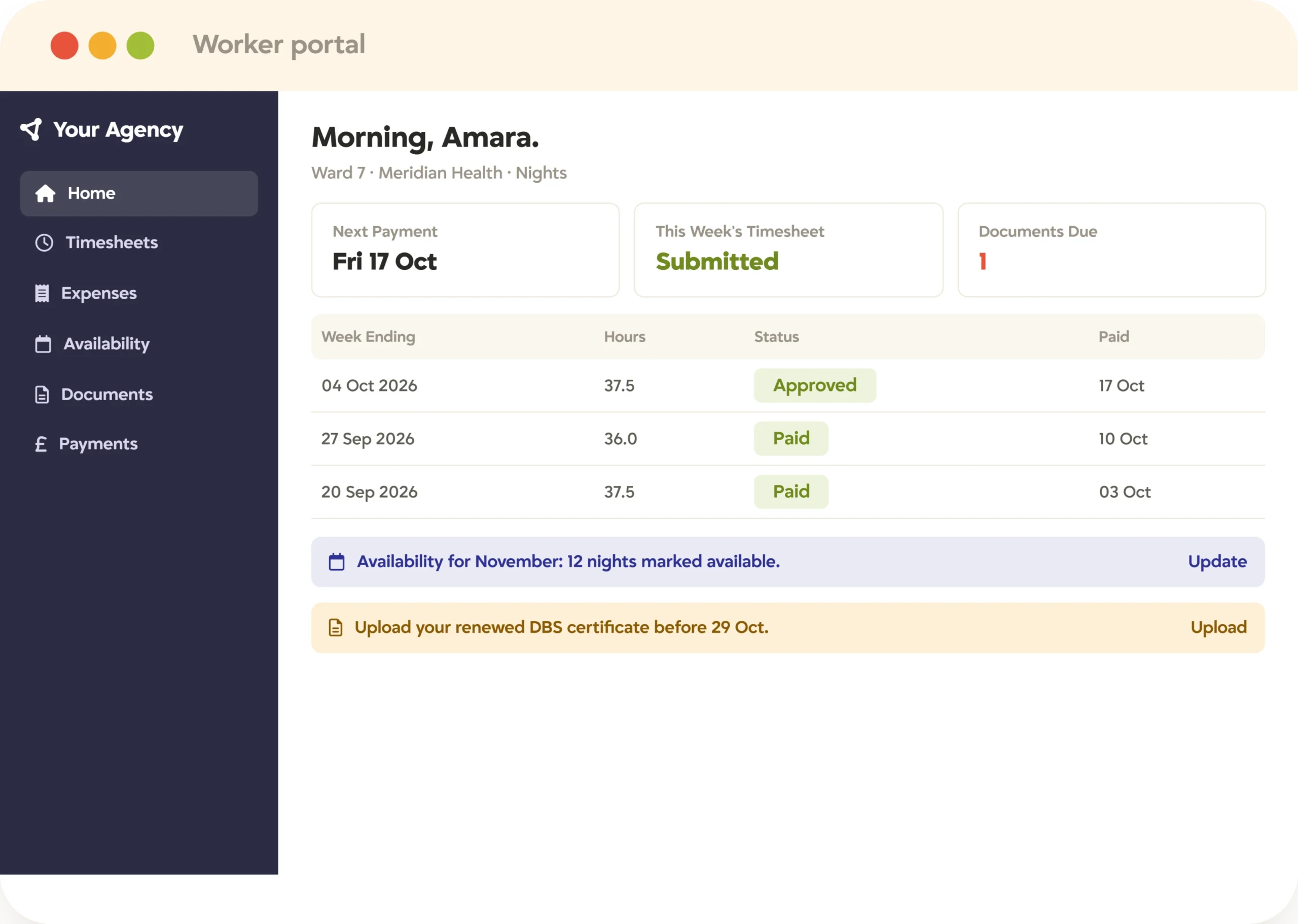
Contractor & Worker Self-Service Portal
The first place workers
go to find what they need
Easy questions go to the portal. Hard ones get a person. The back-office team reviews and approves instead of chasing and entering.
A portal in the agency’s brand, not ours. The relationship still feels like yours.
Workers handle their own timesheets, expenses, and documents. The team reviews instead of re-keys.
Availability and absence go in from any device. The desk knows before it has to ask.
Payment dates sit in plain view. One less call to the office.
Matters most to Contractors & back-office teams
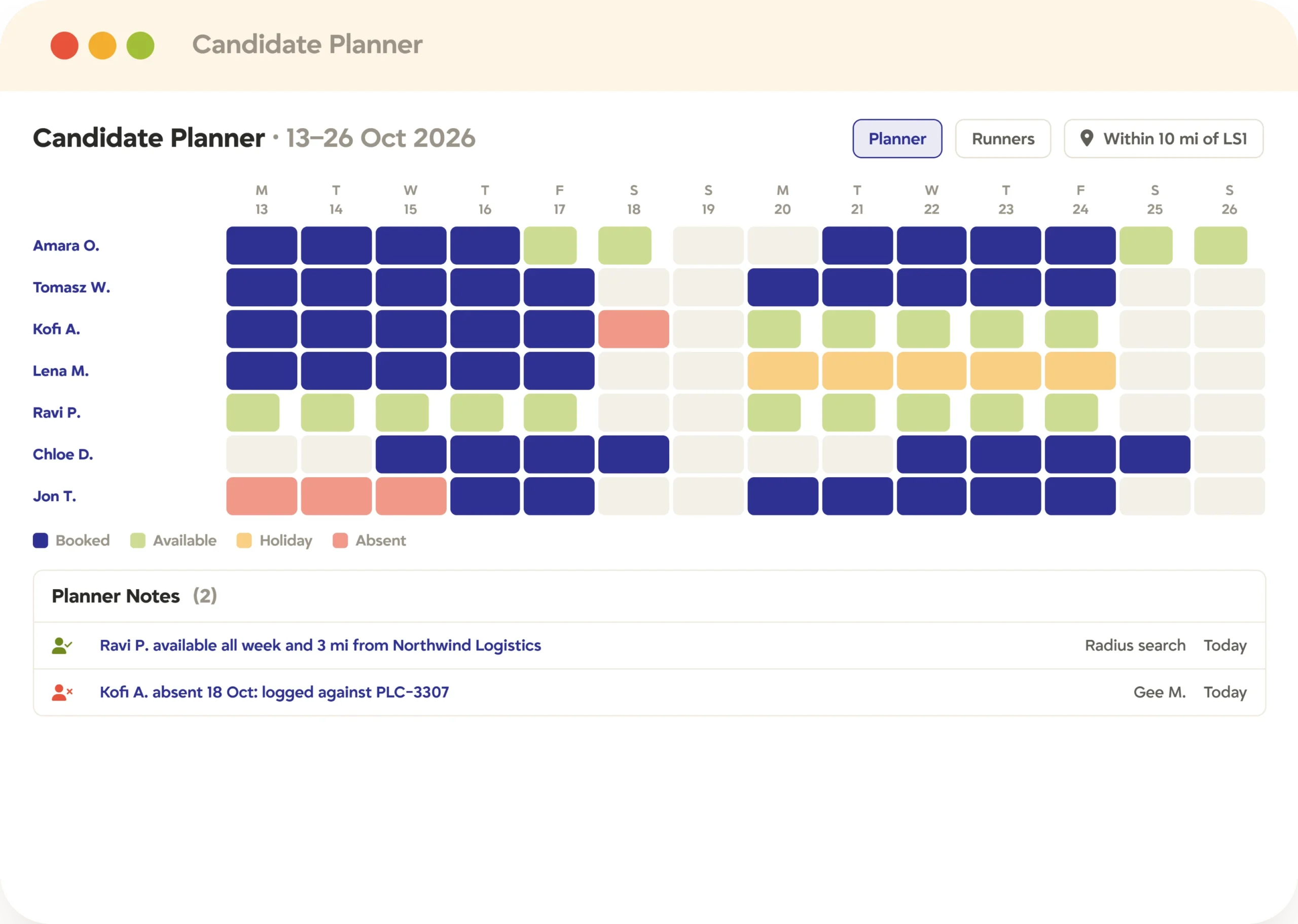
Candidate Planner · Radius search · Shift scheduling
Who’s free, who’s qualified, who’s nearby, in one search
Fill the right shift in minutes, and see every worker, assignment, and deadline in one place.
The Candidate Planner lays out availability by month, with a Runners view of every active temp. The whole desk at a glance.
Radius search surfaces who’s qualified and nearby. Available isn’t the same as right, and the desk sees which is which.
Attendance and absence track against the placement. Logged once, never lost.
Assignment views in Gantt, card, or list. Every deadline where the work already lives.
Matters most to Recruiters & operations
Case study · The Mason Group
Submitting time through Tracker every two weeks across four offices
Clients confirm hours from
an email, replacing a
login-required process
Reviewed over several months before the firm chose Tracker
The contract team switched over a weekend and was running on Monday
Contractor payment issues have essentially disappeared, and the finance team no longer chases missing timesheets. Read the Mason Group story
What changes
Less time on the math. More on the desk.
The invoicing cycle. Workers self-submit, rate cards apply automatically, and the invoice generates once your team approves, across hundreds of active placements.
Enterprise client sign-off is a single click in the portal instead of an email chain, no login or account needed.
A project status update. The plan, the workers, and the progress all connect in one place, no compiling from two sources that disagree.
In their words
The back office, off their minds
We haven't had people complain that they haven't got paid. Our clients have had barely any complaints or questions about the new system, it's a lot easier for them, they just get an email and click a button.
We didn't strategically remove headcount. When back-office employees left organically, we didn't need to replace them because of Tracker.
We haven't had people complain that they haven't got paid. Our clients have had barely any complaints or questions about the new system, it's a lot easier for them, they just get an email and click a button.
We didn't strategically remove headcount. When back-office employees left organically, we didn't need to replace them because of Tracker.
We haven't had people complain that they haven't got paid. Our clients have had barely any complaints or questions about the new system, it's a lot easier for them, they just get an email and click a button.
We didn't strategically remove headcount. When back-office employees left organically, we didn't need to replace them because of Tracker.
We haven't had people complain that they haven't got paid. Our clients have had barely any complaints or questions about the new system, it's a lot easier for them, they just get an email and click a button.
We didn't strategically remove headcount. When back-office employees left organically, we didn't need to replace them because of Tracker.
It's a couple of minutes of time now where it used to be significantly longer. We don't need to scale our back office, because that process just works.
Tracking invoices paid and raised is very valuable, especially with it being integrated with our QBO. That's a great feature.
It's a couple of minutes of time now where it used to be significantly longer. We don't need to scale our back office, because that process just works.
Tracking invoices paid and raised is very valuable, especially with it being integrated with our QBO. That's a great feature.
It's a couple of minutes of time now where it used to be significantly longer. We don't need to scale our back office, because that process just works.
Tracking invoices paid and raised is very valuable, especially with it being integrated with our QBO. That's a great feature.
It's a couple of minutes of time now where it used to be significantly longer. We don't need to scale our back office, because that process just works.
Tracking invoices paid and raised is very valuable, especially with it being integrated with our QBO. That's a great feature.
See it for yourself
See the back office run itself
Book a 30-minute demo and we’ll show you your desk running on Tracker’s back office software. Timesheets to invoices to payment, in one place.
FAQ
Back office questions, answered
Recruitment back office software runs the financial and operational layer of a staffing business, timesheets, expenses, rate cards, and invoicing, feeding clean data to your payroll provider, and connects each part so data flows automatically instead of being re-entered between systems.
Yes. Tracker offers two-way accounting integration with QuickBooks (Online and Desktop), Sage, and Xero, plus flat file and a Zapier API for other systems. Invoices sync out, and paid status syncs back.
Workers self-submit timesheets through a white-labeled portal on any device. Automated checking flags discrepancies before approval, and the right rate card applies automatically at the point of processing.
Yes. Through the candidate portal, workers submit timesheets, photograph receipts for AI-scanned expenses, declare availability, and request absence, all without calling the office.
Tracker connects to your chosen payroll bureau or umbrella company and feeds it the right data in the right format, it powers your payroll process rather than replacing your provider.
Yes. Client approval workflows route timesheets to the client for sign-off before invoices go out, meeting enterprise requirements without adding manual steps.
Compliance obligations connect to the placement record and are handled within the back-office workflow for the relevant market, including IR35 status and holiday pay in the UK, and WOTC eligibility, I-9 verification, and state-specific payroll withholding in the US.
Yes. The same process scales from 50 temps to 500, with bulk invoicing, payroll data for your provider, rate-card automation, and shift scheduling built for the volume temp and contract desks run at.