
Choosing a new ATS is not a feature-shopping exercise. For recruiting teams and staffing firms evaluating a switch, the better starting point is a structured evaluation tied to real hiring workflows, team usage, and reporting needs.
This guide covers how to choose an ATS by working through the criteria that matter before vendor conversations start and the steps that keep the process consistent from shortlist to signed contract.
Why an applicant tracking system is more valuable now than ever
Recruiting teams are asking more from their systems because hiring work has grown harder to manage across tools, stakeholders, and approval layers.
- Hiring activity moves through more stages and more people. A strong system of record keeps jobs, candidates, feedback, and communication connected.
- Candidate responsiveness expectations are higher. Missed handoffs and slow replies create friction that costs teams momentum at the worst possible moment.
- Skills-first evaluation requires structured workflows and clean, searchable data. Over half of organizations worldwide have already started the shift to a skills-based hiring model, with another 23% planning to do so within the next 12 months.
- Compliance and data risk expectations are increasing. Teams need stronger access controls, cleaner audit history, and clearer ownership of candidate records.
- Automation is now a baseline requirement for reducing admin load, not a premium add-on. It still needs to be validated against real workflows, not assumed from a demo.
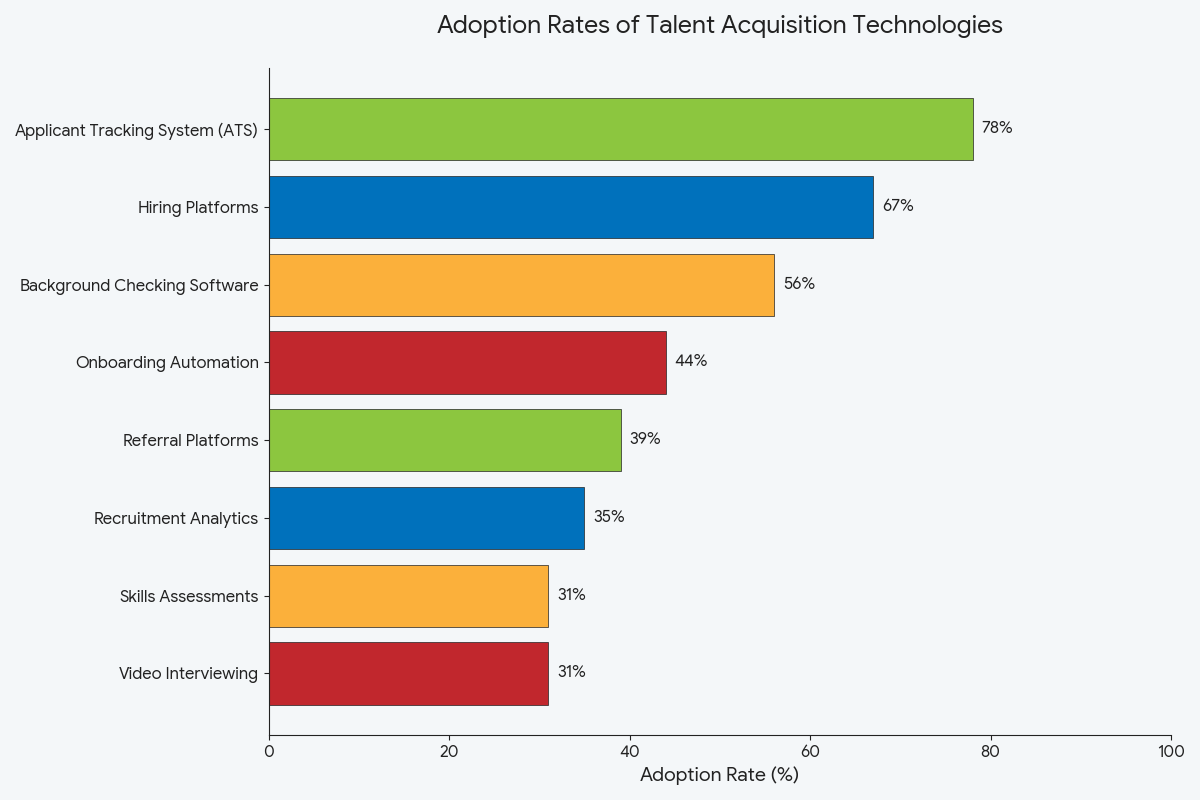
The gap between technology investment and actual impact remains wide. Only 43% of HR professionals rate their TA (Talent Acquisition) technology stack as good or excellent, according to HR.com’s Future of Recruitment Technologies report. That number makes a deliberate selection process more important than ever for any talent acquisition team evaluating recruitment software.
Important factors to consider when choosing an ATS
Before comparing vendors, recruiting teams need a clear set of criteria to work from. These are the evaluation pillars that shape a consistent, useful comparison across the recruitment process.
| Factor | Why a must-have | What to evaluate |
|---|---|---|
| User experience and adoption | Low adoption is the most common reason an ATS fails to deliver value. Poor UX drives low adoption at the start, and weak vendor support sustains it over time. | Does it let recruiters complete common tasks without workarounds? Is navigation intuitive enough for hiring managers to participate without extra training? |
| Integration capabilities | Disconnected recruiting software creates duplicate work and gaps in candidate data across the recruitment process. | Does the vendor confirm integrations through documentation, not just demos? Does it connect with the human resource information system (HRIS), email, calendar, and background check tools already in use? |
| Scalability and size | One of the important factors in choosing an enterprise ATS is whether the platform grows with the business without adding admin overhead. | Does it handle layered permissions and reporting capabilities across multiple teams? Does implementation complexity scale reasonably at higher user counts? |
| Automation and features | Automation reduces time spent on repeat admin work, freeing recruiters for candidate sourcing and relationship building. | Does resume parsing work accurately across file formats? Does interview scheduling sync with existing calendars without manual steps? |
| Candidate experience | A slow or difficult application flow costs teams qualified candidates before the first conversation. | Is the application mobile-friendly and easy to complete? Are candidate communication templates available to keep applicants informed at each stage? |
| Compliance, data security, and reporting | Weak access controls create compliance exposure, and 72% of organizations cite lack of measurable ROI as the main barrier to HR technology investment, making both oversight functions critical at the point of selection. | Does the system support role-based access, audit trail visibility, and retention controls? Can the team track candidate sourcing performance and pipeline activity without manual exports? |
Choosing based on a polished demo rather than real workflows is the most common mistake. Others include skipping integration validation, underestimating data migration and training effort, and comparing vendors on license price without reviewing the total cost of ownership. These are the factors to consider when choosing an ATS that affect both adoption and long-term cost.
Choosing an ATS software
The strongest buying process mirrors how the team hires. These steps give recruiting and staffing teams a repeatable way to compare systems, test workflow fit, and reach a decision with fewer surprises after signing.
Step 1: Define hiring context and selection criteria
Start with the hiring environment the ATS needs to support: role mix, hiring volume, recruiter workload, stakeholder involvement, and reporting needs. Recruitment needs vary significantly by team size and structure, so set budget guardrails early and decide which pricing structure is acceptable before vendor conversations begin.
Set pass or fail filters around UX, mobile experience, and core integrations such as HRIS and communication tools. This is where teams stop guessing and start defining how to choose an applicant tracking system based on actual operating requirements.
Step 2: Map workflows the ATS must support
Map the end-to-end workflow at a high level: intake, sourcing, screening, scheduling, feedback, offer, and reporting. Include every point where hiring managers need visibility or need to take action, so access requirements are clear before demos begin. Candidate communication expectations should also be mapped here, covering status updates, reminders, and follow-up touchpoints.
When ATS and CRM matter: If the team manages client accounts and contacts alongside candidate workflows, ATS and CRM capability should be treated as a workflow requirement, not an optional extra. Confirm this directly in demos and again when reporting and visibility are reviewed. For a closer look at how the recruiting lifecycle maps to platform requirements, that post covers the full picture.
Step 3: Build a shortlist and compare vendors consistently
Once the team knows its workflows and requirements, narrow the field to a manageable shortlist and apply the same comparison categories to every vendor. Knowing what to look for in an applicant tracking system means screening early for the gaps that cause problems after purchase. Red flags that should eliminate vendors at this stage:
- Unclear or unverified integration claims
- Rigid workflows with limited customization
- Weak or hard-to-access reporting
- No clearly defined support or escalation model
Step 4: Run demos as proof tests
Every vendor should run through the same live scenarios. Ask each one to demonstrate:
- Resume parsing and screening behavior
- Job posting workflow and distribution options
- Interview scheduling with calendar sync
- Candidate communication templates and status updates
- Reporting views that show pipeline health and bottlenecks
A pass is straightforward to define: recruiters should complete common tasks without workarounds, hiring managers should participate without friction, and the outputs should be usable immediately. If the system looks polished but the workflow feels slow or forced, that matters. After each demo, verify integrations, reporting capabilities, and compliance controls through vendor documentation rather than taking demo outputs at face value.
Step 5: Evaluate implementation, migration, training, and support
This is still part of the selection, not something to address after signing. Teams should know who owns the rollout internally and who leads implementation on the vendor side. A single accountable lead on each side reduces the risk of things falling through.
Migration deserves real scrutiny: data migration expectations, field mapping, test runs, validation steps, and a clear cutover plan. Ask how role-based training is handled, how admins are enabled, and what the onboarding process looks like after go-live. You can find more on the important questions to ask your ATS provider before committing.
Step 6: Compare pricing using total cost of ownership
Request itemized pricing for licensing, implementation, migration, training, integrations, and any premium support tiers. Contract terms need attention too, covering renewal structure, minimum commitments, data portability, and the exit path. ATS platforms carry the highest replacement intent of any HR technology category in 2026, at 26.2%.
Why recruiting and staffing teams choose Tracker
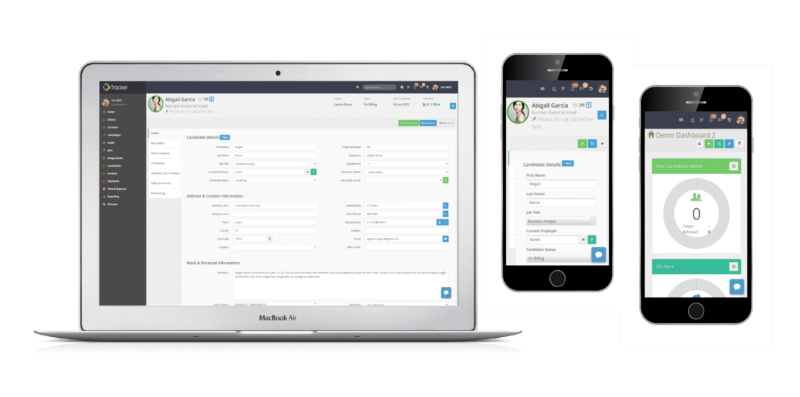
Tracker is a practical option for teams that want ATS selection to stay tied to workflow fit, team usage, and visibility across the hiring process.
- Recruitment ATS and CRM: Teams need one place for candidate management, jobs, client activity, and communication history. Tracker combines recruitment ATS and CRM capability so workflow review does not stop at applicant tracking alone.
- Automation: Built-in automation, sequences, and workflow tools reduce the admin work that slows recruiters down. Clients have reported cutting administrative work time by up to 66% after consolidating onto the platform.
- TrackerAI: AI capability is built directly into the platform, which makes it easier to assess during evaluation how it fits screening, communication, and recruiter activity, rather than operating as a separate add-on layer.
- Job boards: Native job board integration lets teams review how posting activity connects to pipeline building as part of the evaluation.
- Onboarding: Built-in onboarding functionality means setup, compliance-related tasks, and candidate readiness can be tracked in the same system after offer.
- Reporting: Dashboard and reporting capability gives teams visibility into pipeline flow, activity, and business-level performance without relying on disconnected exports.
Closing thought: The right ATS fits your workflows, not just your wishlist
Choosing an ATS gets easier when the evaluation is tied to real recruiting workflows. Tracker brings ATS and CRM together so recruiting and staffing teams can review pipeline flow, integrations, reporting, and implementation readiness in one place.
Request a demo and review how Tracker maps to the criteria in this guide.