You have 0 items in your cart
Key Takeaways
- Disconnected tools cause duplicates and stage confusion when each platform tracks its own version of your candidates.
- Connecting your ATS with scheduling, sourcing, and onboarding tools keeps stage updates consistent across everything you use.
- Start with quick wins like scheduling tools and background checks before moving to complex handoffs like payroll.
- Lock down field mapping and dedupe rules before any connector goes live to avoid integration failures down the road.
- Velocity metrics like time to first response prove whether integration actually speeds up your hiring or just adds more work.
Your recruitment stack should work for you, not against you. When job applications arrive from one place, messages sit in another, and stage updates live somewhere else, you spend more time on manual data entry than hiring people.
As organizations shift toward boundaryless HR, where HR teams work across functions instead of in silos, disconnected hiring platforms become a barrier. Human Resources leaders need integrated systems that support collaboration between recruiting teams, hiring managers, and operations.
ATS integration for recruitment connects your sourcing, screening, scheduling, and onboarding tools so stage updates stay accurate and reporting stays trustworthy. This guide covers the five workflow breakpoints, what to connect first, data governance, and metrics that prove integration works.
What is ATS integration?
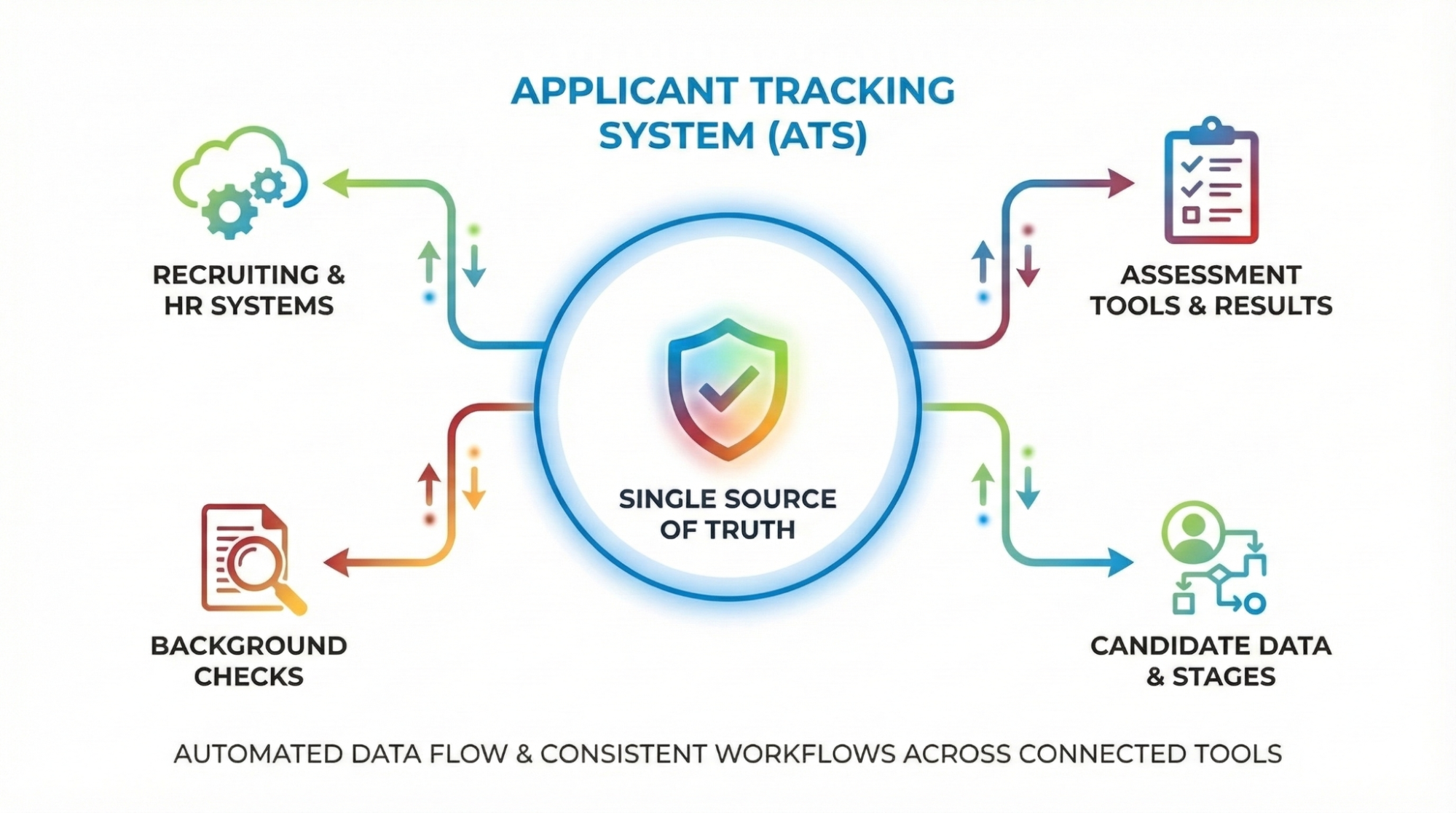
ATS integration connects your applicant tracking system with other recruiting and HR systems. Candidate data, interview stages, assessment tools results, and background checks flow between platforms automatically, eliminating manual processes.
You get a single source of truth where candidate details and recruiting workflows stay consistent across every connected tool.
The 5 workflow breakpoints caused by disconnected recruiting tools
Fragmentation hits the same pressure points in every recruitment operation, even when your tech stack looks different. With over 10 million monthly hires and separations happening across the country, manual handoffs between recruiting teams and hiring managers turn into bottlenecks fast.
Here’s where disconnected tools break down:
- Candidate identity fractures and duplicates: Job candidates arrive through job boards, referrals, and social media. When each source creates its own candidate profile, recruiters lose visibility into history and eligibility. Duplicates reduce search accuracy and make redeployment harder.
- Stage truth drifts across systems: When one platform shows a candidate as submitted and another shows them as screened, hiring managers can’t agree on pipeline reality. Stage-based tasks trigger at the wrong time or not at all, creating avoidable risk.
- Communication and scheduling gaps: Email and text messaging, calendar invites, and scheduling tools often live outside the ATS record. Recruiters rely on memory or inbox searches. Follow-up slows down, reschedules get missed, and candidate engagement becomes inconsistent when multiple people work the same job requisition.
- Offer to onboarding handoff breaks: Offers, documents, and approvals sit in separate systems with limited ATS visibility. Recruiters chase signatures and start date confirmations. Delays hurt candidate experience and create unnecessary drop-off after acceptance.
- Reporting and analytics become inconsistent: When stages, timestamps, and ownership differ by system, reporting stops reflecting reality. Leaders can’t compare performance across teams because the underlying definitions conflict. Over time, dashboards become unreliable.
ATS integration blueprint for recruitment: Connect, govern, measure
Start with the handoffs and stage updates that create the most rework right now.
Cost optimization is now a top priority for HR tech investments. Integration lets you consolidate vendors and cut licensing costs.
This section covers what to connect first, common integration approaches, governance rules, and how to measure success.
Quick-win integrations to fix workflow breakpoints first
Focus on high-frequency tasks first, then move into handoffs involving more stakeholders. Start with the recruiting workflows that create the most manual work or cause the biggest delays in your candidate pipeline.
| Priority bucket | Integration | What it fixes | Typical sync direction |
|---|---|---|---|
| Quick wins | Scheduling tools and calendar sync | Reduces back and forth on interview booking and rescheduling | Two-way |
| Quick wins | Email and text messaging capture into ATS | Keeps conversations visible and tied to candidate profiles | One-way into ATS |
| Quick wins | Job distribution and inbound job applications | Centralizes applicant intake and candidate sourcing tracking | One-way into ATS |
| Quick wins | Background checks and assessment tools status to ATS | Prevents manual chasing and stage delays | One-way into ATS |
| Quick wins |
Offers and e-sign status back to the ATS | Improves visibility from offer sent through signature complete | One-way into ATS |
| Next phase | ATS to payroll systems handoff | Reduces admin re-entry after acceptance and start confirmation | One-way into ATS |
| Next phase | ATS and CRM alignment for staffing workflows | Connects client, job, and candidate activity in one workflow | Two-way |
When recruiting teams connect too many tools at once, field mapping and exceptions multiply. A smaller set of high-impact connections builds clean data habits before expanding the stack.
Integration patterns and tradeoffs: Native vs ATS integration API vs iPaaS
As ATS, CRM, and talent intelligence platforms continue to evolve, you’ve got three main ways to connect your systems. How you should proceed really depends on how complex your system is and what resources you have available.
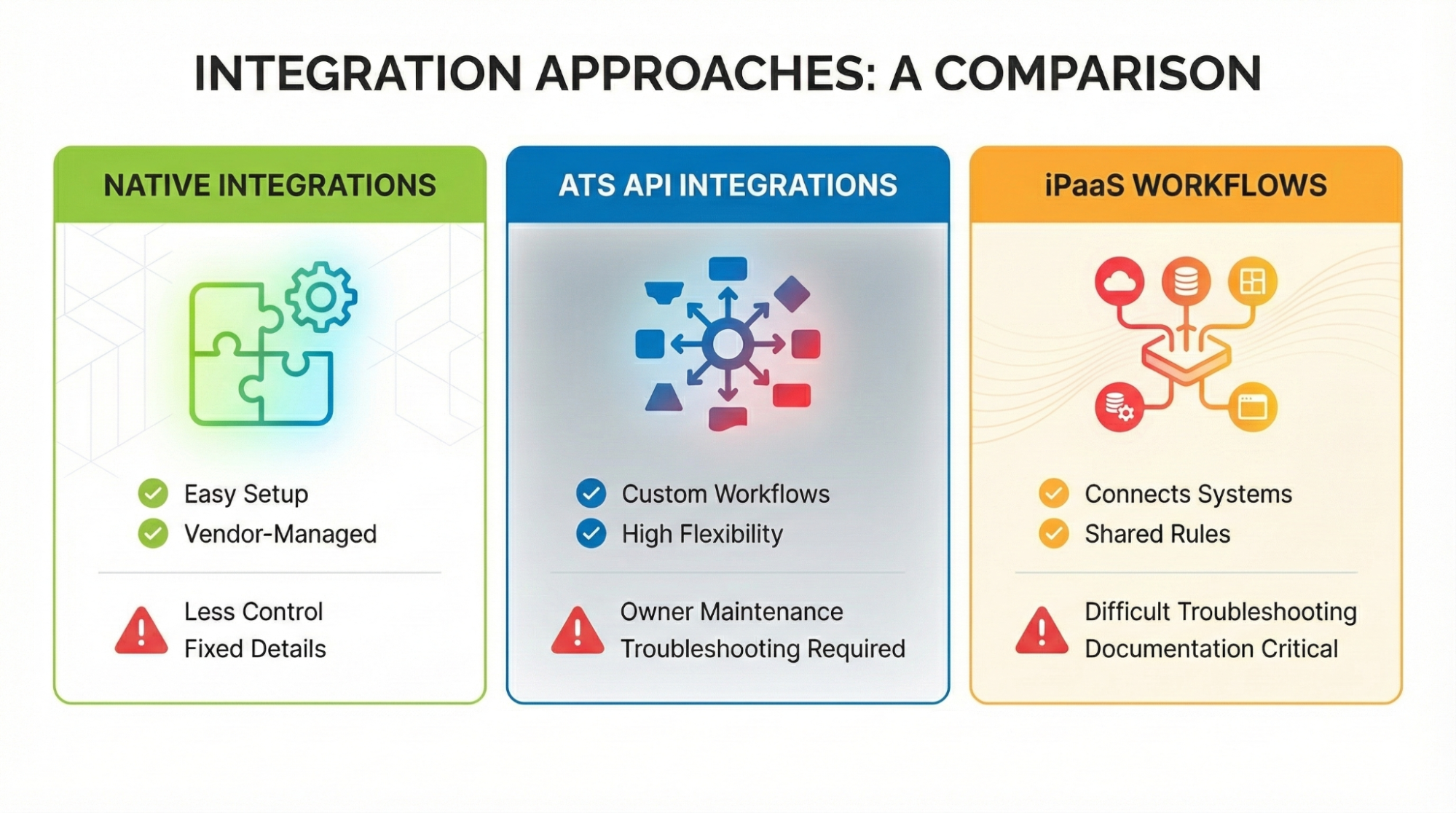
- Native integrations are easy to set up since your vendor handles them, but they offer less control over specific details and timing.
- ATS intergration API approach gives you custom API-based integrations built to match your exact recruiting workflows. The ATS API provides more flexibility for connecting specialized tools, but you own ongoing maintenance and troubleshooting.
- iPaaS workflows connect different systems through an integration platform that follows shared rules. While this approach is great for managing complex setups, it can be difficult to troubleshoot without clear documentation.
Sync direction matters. One-way sync works when your ATS is the system of record. Two-way sync helps with scheduling and messaging, but needs stricter rules to prevent conflicting edits.
Data governance checklist to prevent stage drift and duplicates
Most integration failures come from stage drift, duplicates, and unclear ownership, not missing connectors.

Lock down these basics before any connector goes live:
- Define field mapping, data normalization rules, and required fields for your candidate pool
- Set canonical objects and owners for candidate, job, client, submission, interview, offer
- Establish dedupe and merge rules with a primary match key
- Limit permissions using least privilege and document access roles for HR managers and recruiters
- Maintain an audit trail with traceability for stage edits and timestamps
- Standardize reporting definitions and stage timestamp rules across connected tools
- Align retention rules so records remain consistent over time
Security & compliance needs vary by region and industry. Clear governance turns integrations into reliable systems.
KPI scorecard to prove ATS integration is working
You need metrics to show which connections reduce friction and which create new work. With industry benchmarks at an average 42-day time to fill, you need proof that integration improves velocity across your candidate pipeline.

Track these:
Velocity and throughput:
- Time to first response: Measures speed from job application to first recruiter touch
- Interview scheduling cycle time: Tracks time from invite to confirmed interview slot using scheduling tools
- Offer turnaround time: Measures time from offer sent to decision recorded in candidate data
Quality and conversion:
- Submission to interview rate: Signals whether candidate sourcing and submissions match client expectations
- Interview to offer rate: Tracks shortlist quality and stakeholder alignment across interview stages
- Offer acceptance rate: Reflects candidate fit and end-stage candidate experience
Data health and reliability:
- Duplicate record rate: Indicates identity control across sources and imports
- Stage reconciliation rate: Tracks how often status must be corrected manually
- Sync error resolution time: Measures how quickly failures get identified and fixed
KPI ownership should sit with a clear operator who can connect issues to workflows. Weekly review keeps attention on exceptions and stage truth.
Tracker as the workflow hub for ATS and CRM
A connected stack needs one platform that holds the workflow record your team trusts for stage updates, history, and reporting. Tracker keeps your recruiting and client activity in one place, cutting out handoffs between disconnected tools.
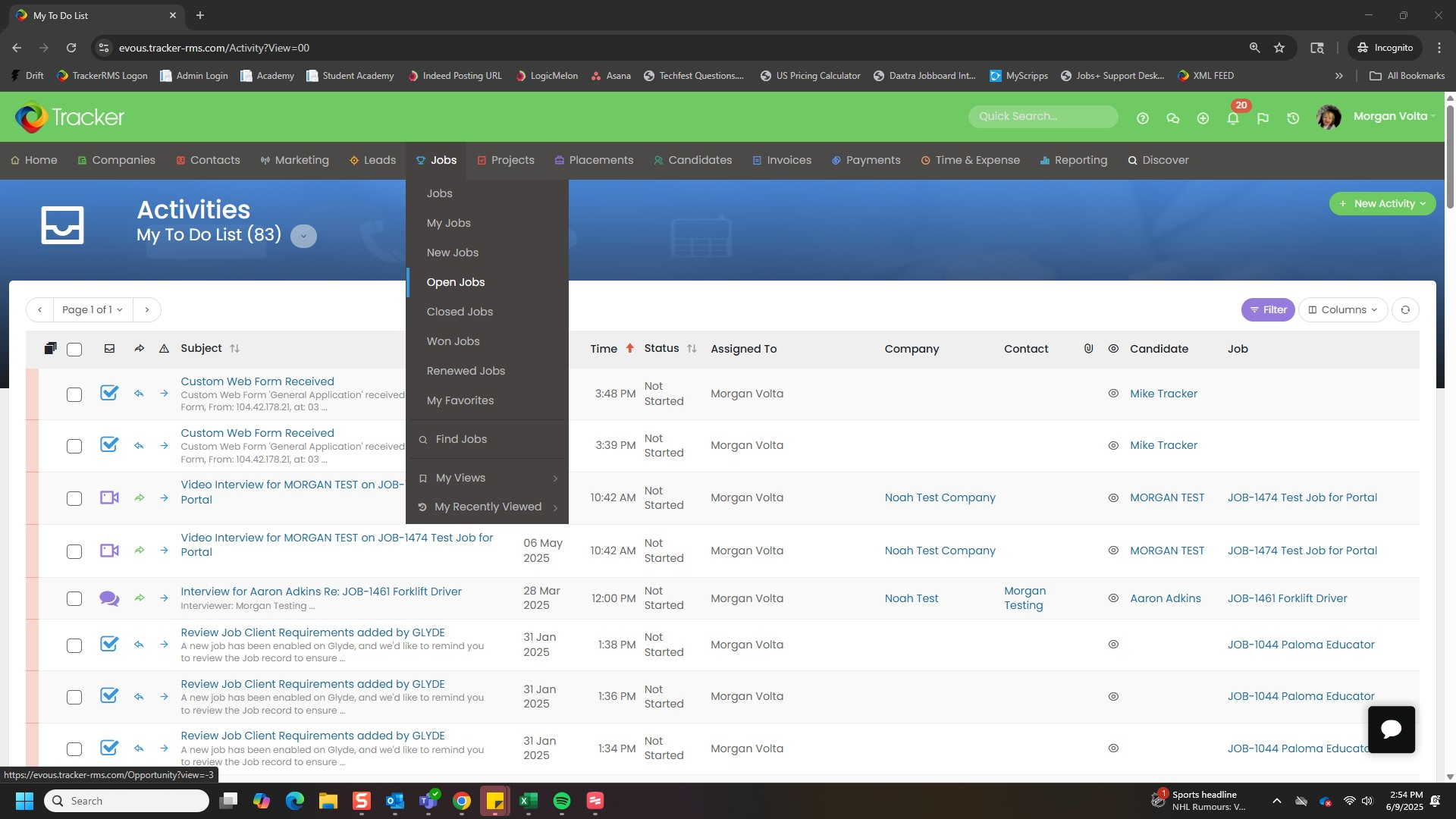
- Recruitment ATS and CRM combined: Tracker brings applicant tracking and CRM together so records and stage updates stay consistent
- Built-in automation: Automations run inside Tracker to reduce manual handoffs
- Job board connections: Job board integrations keep posting and applicant flow centralized
- Onboarding in the same system: Onboarding steps and compliance setup stay in Tracker after acceptance
- Reporting that works: Dashboards and reporting track pipeline performance and surface workflow breakdowns
Tracker’s integrations connect recruiting and HR tools to prevent fragmentation. Use recruitment marketing automation and TrackerAI alongside your core workflow without switching systems.
Conclusion: Fix fragmentation with ATS-led integration
When hiring slows down due to mismatched systems and unclear roles, it can be frustrating. Starting with a strong integration plan helps address the biggest issues first and keeps your data accurate.
Book a Tracker demo to evaluate your current setup, pinpoint where the problems are, and see which integrations can improve your reporting and updates.
FAQs
Who should own ATS integrations in an enterprise or staffing agency, recruiting ops, IT, or both
Ownership works best as a shared model. Recruiting ops defines workflow requirements, field rules, and KPIs. IT governs security, access, and reliability standards. Clear accountability for monitoring prevents integrations from becoming set and forget.
What should be documented before integrating an ATS to avoid workflow drift later
Document canonical objects, field mapping, required fields, stage definitions, sync direction, and dedupe rules. Include who owns each workflow, what triggers exist, and how exceptions are handled. This prevents conflicting edits and reporting mismatches.
How should teams handle integration failures and data-sync errors without disrupting hiring workflows
It’s important to have a clear plan for handling sync errors, including who will sort them out and what may need to be put on hold. Utilize monitoring alerts and keep a brief list of key fields, along with a manual backup for stage updates. Checking in regularly can help minimize repeated issues and keep the pipeline running smoothly.