Mobile Recruiting Software for Staffing Agencies
Some desks stay at the office. Yours follows you.
Pipeline checked from the parking lot. Compliance updated from the factory floor. Calls captured the moment they happen. Tracker OTM puts the full platform on any phone.
How it works
Three groups of people, one platform on a phone
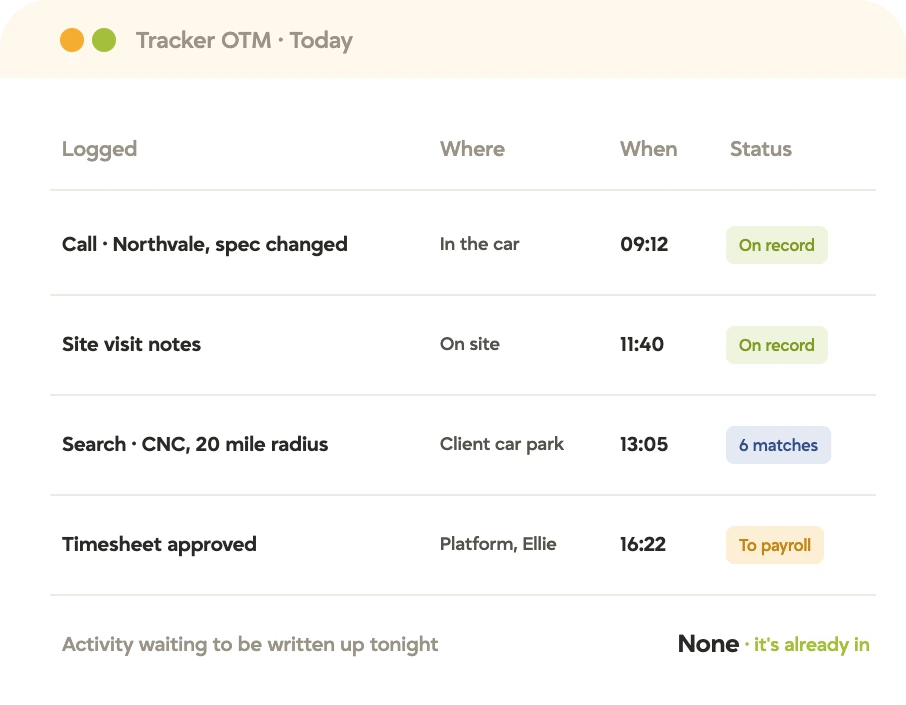
Tracker OTM, short for On The Move, extends the platform to every person in the relationship: the recruiter in the field, the candidate managing their own working life, and the client managing their own hiring. All three write to the same record.
The recruiter
Tracker OTM
100% of Tracker on any phone or tablet, on iOS and Android. Not a read-only view, not a stripped-down version. Every record, every action, every workflow.
Logged on the way out of the building
The candidate
Candidate portal
Workers request shifts, set availability, submit timesheets and expenses, keep compliance current and message their recruiter. Without calling the office.
The answer in thirty seconds
The client
Client portal
Hiring managers approve timesheets in bulk, raise requisitions, review submissions and schedule interviews, with the guardrails that keep the agency in control. No email in the middle.
A requisition raised at 9pm on a Sunday
Everything entered on a phone is the same record everyone else is looking at on a desktop, and there’s no mobile copy of the database to reconcile.
Tracker OTM · Search · Dashboards
The whole desk. In your pocket.
The client at lunch asks about the candidate’s history, and the answer’s right there. Marcus answered before the food arrived.
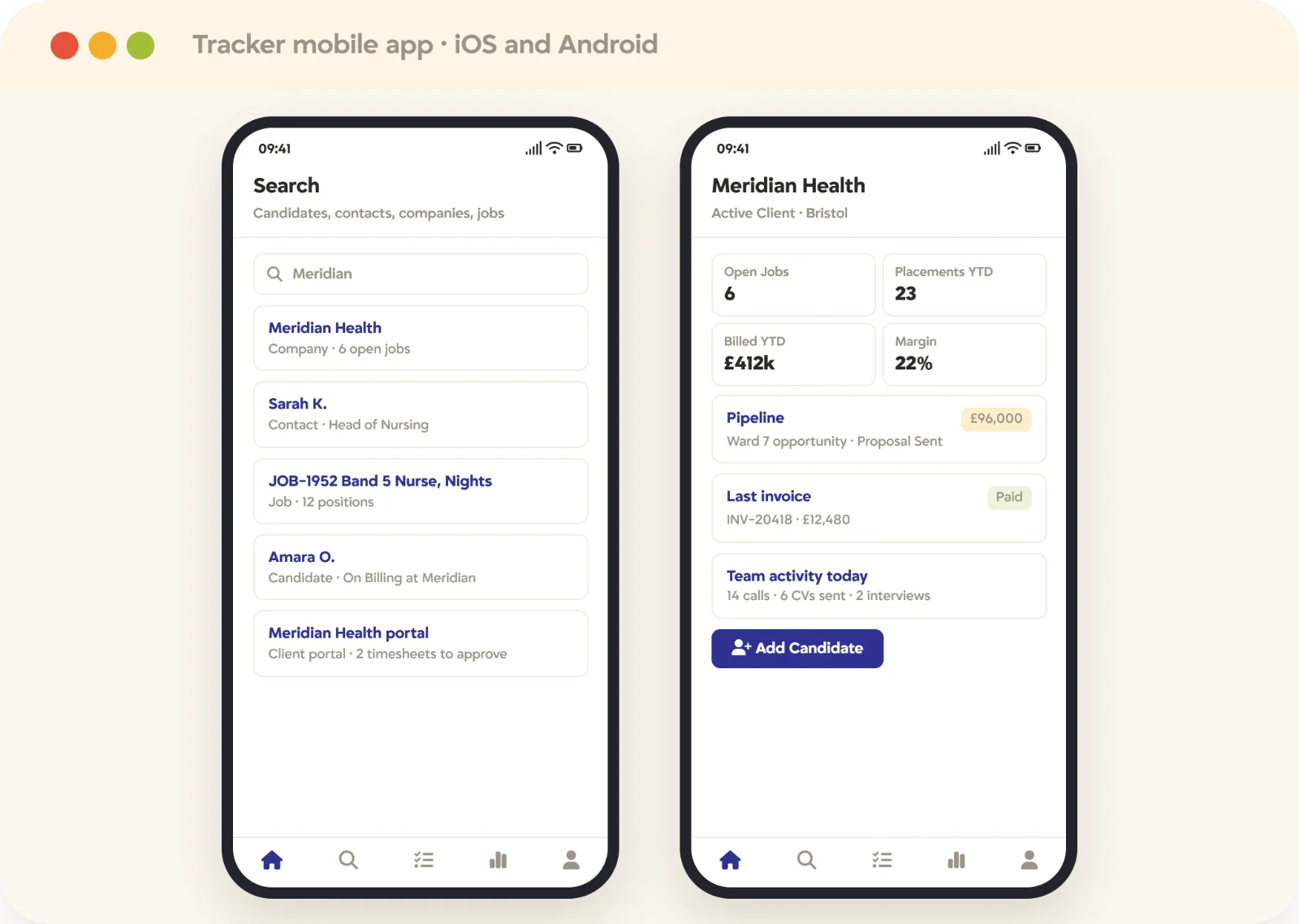
Search the whole system, including the client and candidate portals. Candidates, contacts, companies, jobs and placements.
Open any record and see the pipeline and billing history before you respond. The conversation happens in real time, not “I’ll call you back”.
Dashboards and team activity on the phone. Leadership visibility from anywhere.
Process new candidates from the field. Not saved for the next day.
Available on iOS and Android. The same platform, not a second one.
Matters most to Recruiters
Activity logging · Click-to-call · @mentions
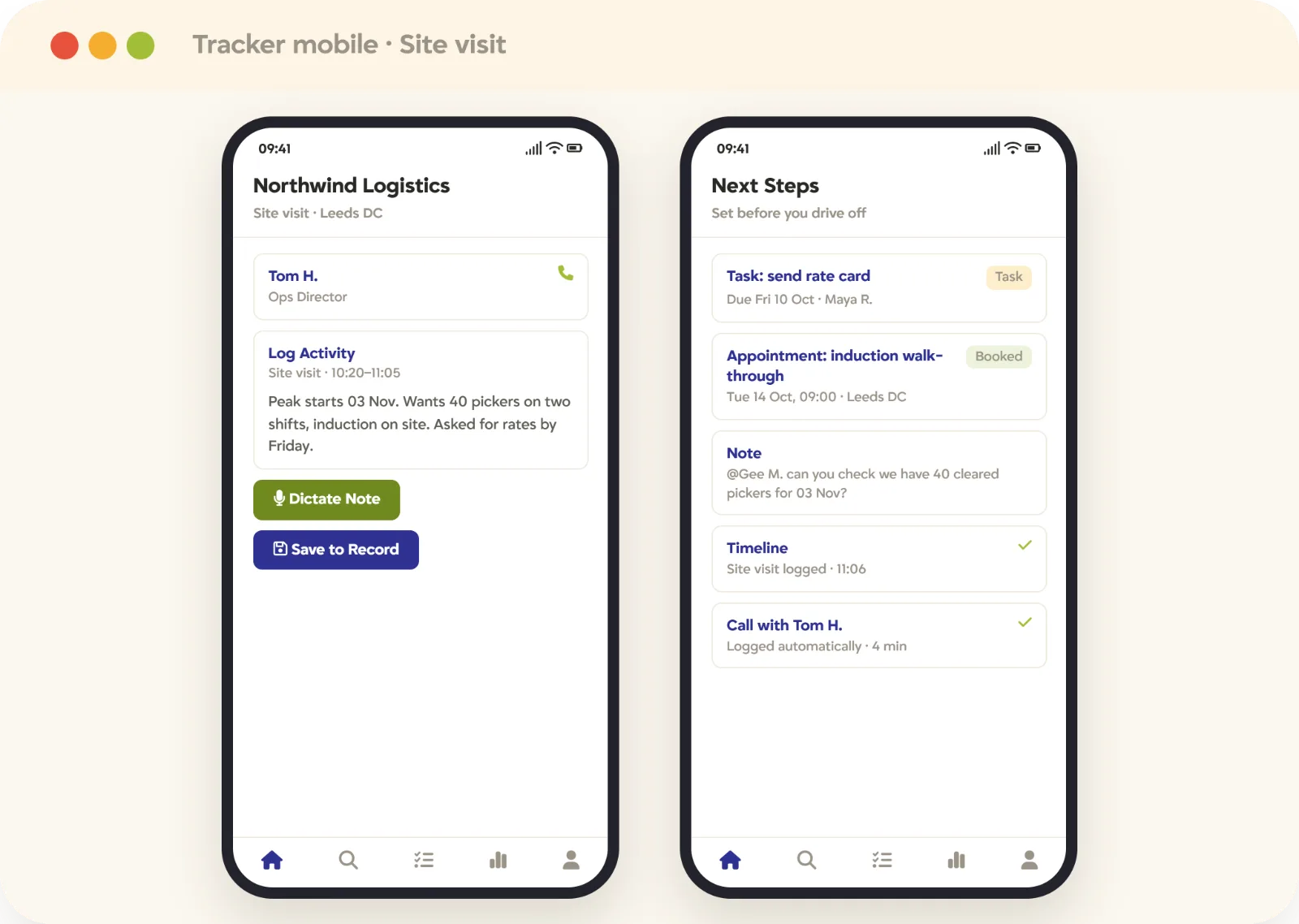
Maya’s Tuesday site visit got logged at the site visit.
By the time you’re back at your desk, the work is already done. The site visit is logged, and the conversation with the client is already on the record, ready for the next one.
Log calls and activity in real time, against the right record. Before you’ve left the car park.
Click to call, with the call captured as it happens. Not reconstructed from memory.
Tasks and appointments set from the phone. The next step in place before you drive off.
@mention a colleague to bring them straight into the record. See Video & Communications.
Everything lands on the shared timeline. Whoever picks it up next already knows.
Matters most to Recruiters & business development
Candidate portal · Shift requests · Timesheets
Workers who manage themselves come back for the next shift.
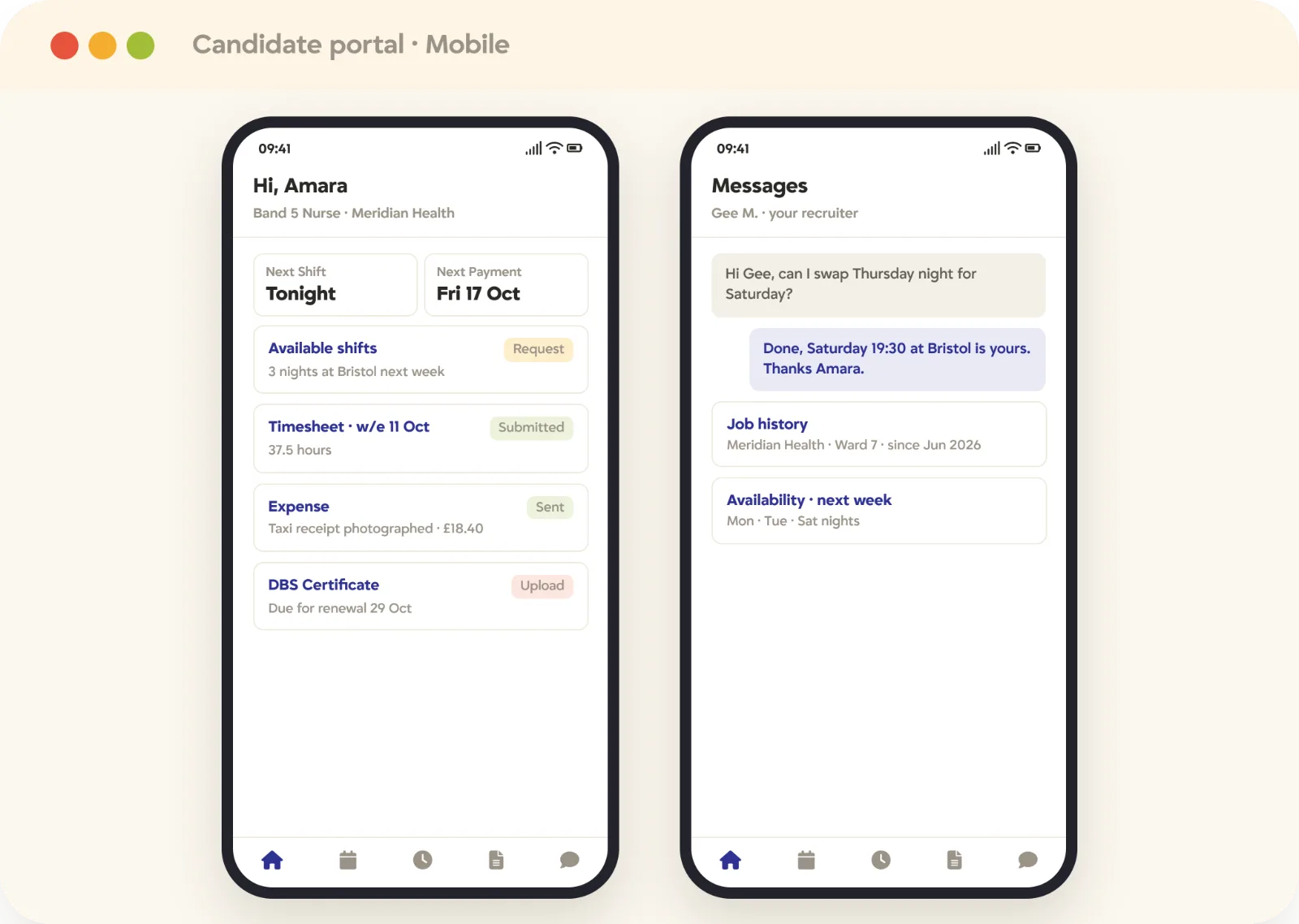
Everything a candidate needs to run their working life, from any device, without calling the office. The back office gets the morning back.
Request shifts and set availability for the week. The recruiter sees it in real time.
Submit timesheets and photograph expenses. On the day, not on the Monday.
Upload and review compliance documents, with a notification when something is due. Renewed before it lapses, so the shift is never at risk.
See job history, timesheet status and expected payment date. The answer in thirty seconds.
Message the recruiter directly. A person, not a number.
Matters most to Candidates & contractors
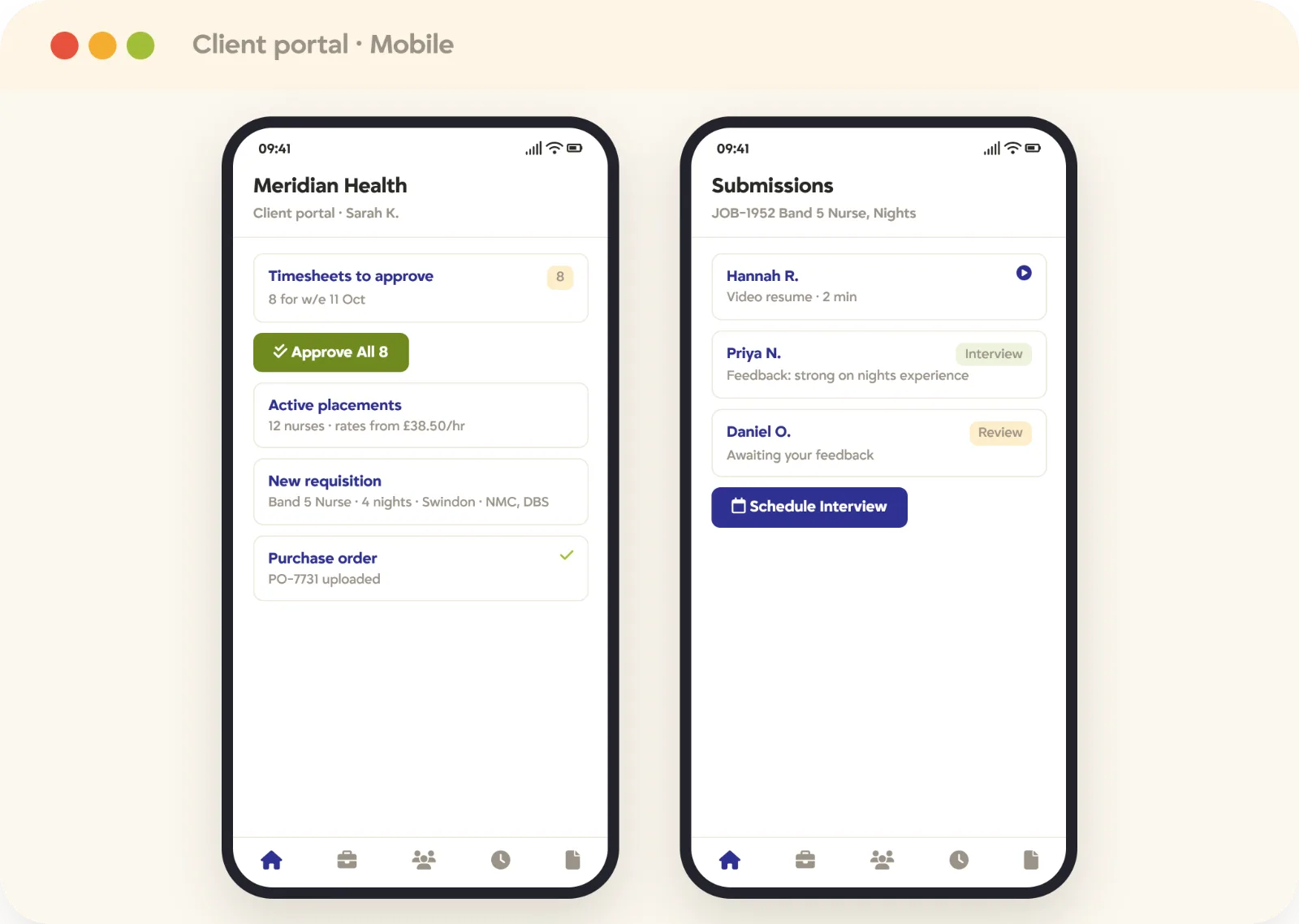
Client portal · Timesheet approval · Requisitions
The client who always knows where things stand keeps calling back.
Every action the client used to email the agency for now happens directly, with the right guardrails so the agency stays in control.
Approve timesheets in bulk. Between their own meetings.
Add new job requisitions with shift details, location and credential requirements. At 9pm on a Sunday, and covered before Monday.
Review submissions, view video resumes, leave feedback and schedule interviews. The process moves without a single email.
See active placements with rates and dates. No status update to request.
Upload compliance documents and manage purchase orders. In a branded portal.
Matters most to Hiring managers & clients
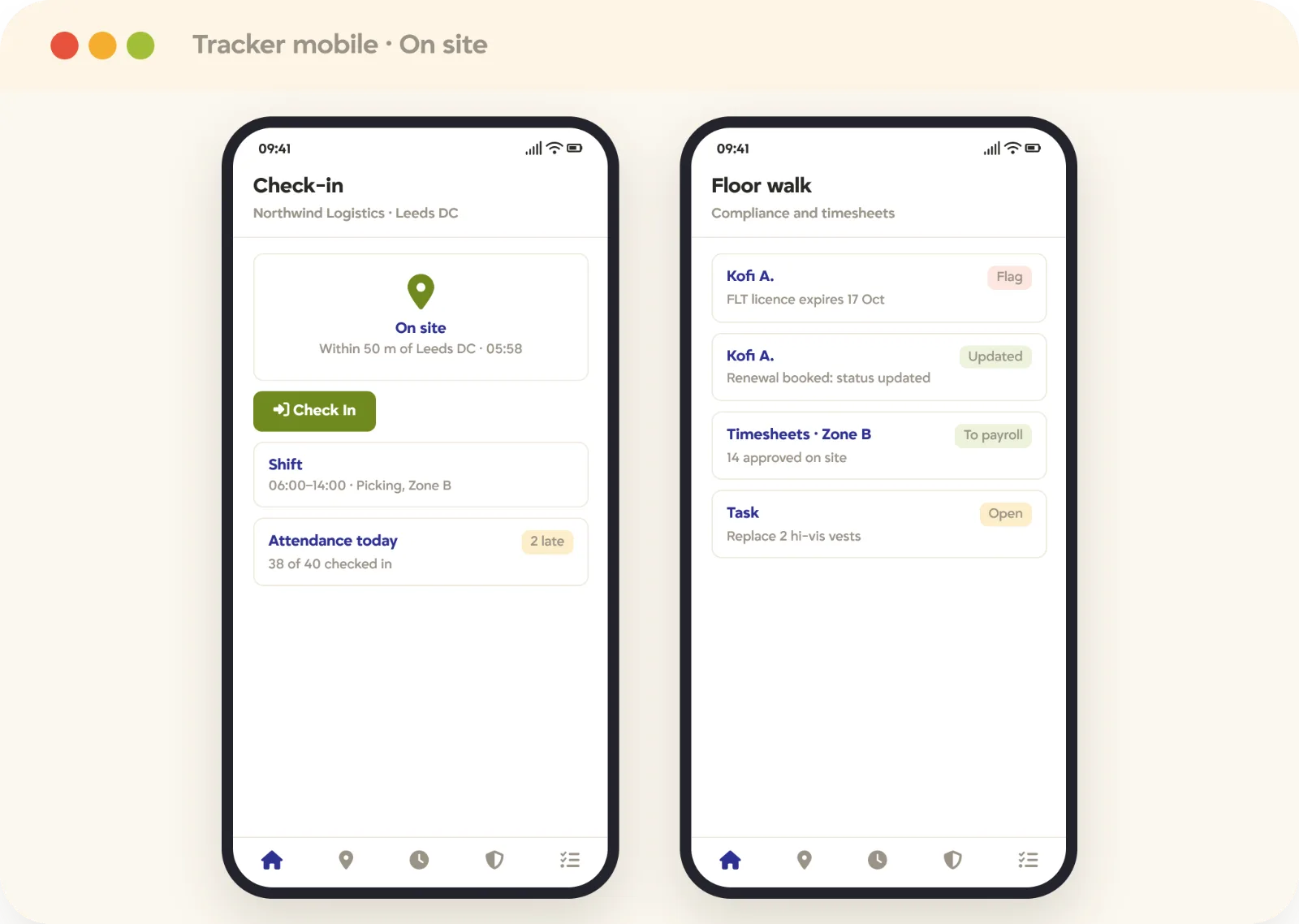
Geolocation · Check-in · Shift tasks
The compliance flag came up on the warehouse floor. It got logged there too.
For industrial and high-volume desks, this is how the work actually gets done. Nothing waits until Friday afternoon.
Geo-location check-in and check-out from the site. Where the site requires it.
Timesheet approvals and attendance logged on the spot. Straight through to back office and your payroll provider.
Compliance statuses updated as you walk the floor. See compliance.
Shift-related tasks managed from the phone. The pay and bill run finishes without a chase list.
Matters most to Contractors & back office
See it on your own desks
Run a client visit from the phone.
Tell us what a consultant does between leaving the office and getting back to it, and we’ll walk the same morning in Tracker OTM. Thirty minutes, live, no slides.
Where it matters
The moments that never reach a keyboard
The client lunch. The parking lot. The factory floor. The desk was there for all of it.
The client visit
An hour of detail that has to survive the drive back.
Read the account history before you go in
Log the requirement while the words are fresh
Search for a name they mentioned, on the spot
Set the follow-up task before you pull away
Out of hours
Candidates answer in the evening. Clients decide on a Sunday night.
Reply to a candidate without opening a laptop
Approve a submission from the sofa
Check tomorrow’s interviews and the notes behind them
See the offer that landed at seven
On site
Contract and temp desks where nobody involved has a desk.
Check in at the start of a shift
Submit hours and expenses from the gate
Capture a compliance document as a photo
Approve and send to pay without a paper run
What changes
No work waits for “when I’m back at my desk”
Two site visits and a networking event, every note on the right record before she left the car park.
The director checks the pipeline and billing history at the table, and the placement moves forward.
Compliance, attendance and timesheets logged during the twice-weekly site visit. The certification issue gets logged the day it’s found.
The contractor checks his timesheet approval and payment date himself, and the worker sets her own availability.
The hiring manager bulk-approves timesheets, reviews submissions and schedules interviews without the back-and-forth.
A requisition raised from the client’s phone reaches the on-call coordinator in real time, and the shift is filled before Monday.
Mobile is the same system, not a second one
There’s no separate mobile database, no sync step and no reduced feature set to work around. That’s the whole design intent.
Tracker OTM is included from the Core plan; geo-fencing is an Enterprise capability.
Permissions follow the user, so a phone shows exactly what a desktop would.
Client and candidate portals run in a mobile browser, with nothing to install.
Heavy work like bulk edits, report building and configuration is still better on a desktop.
In their words
What changes when the system isn’t tied to a desk
It benefits me in so many ways that I have everything all in one platform, from profiles, CVs, notes and information, clients, and I can even send text messages and emails from it.
If I'm a remote recruiter I can go into Tracker and get all the updates I need on the job orders I'm working on without talking to anyone. That could not happen at all before.
It benefits me in so many ways that I have everything all in one platform, from profiles, CVs, notes and information, clients, and I can even send text messages and emails from it.
If I'm a remote recruiter I can go into Tracker and get all the updates I need on the job orders I'm working on without talking to anyone. That could not happen at all before.
It benefits me in so many ways that I have everything all in one platform, from profiles, CVs, notes and information, clients, and I can even send text messages and emails from it.
If I'm a remote recruiter I can go into Tracker and get all the updates I need on the job orders I'm working on without talking to anyone. That could not happen at all before.
It benefits me in so many ways that I have everything all in one platform, from profiles, CVs, notes and information, clients, and I can even send text messages and emails from it.
If I'm a remote recruiter I can go into Tracker and get all the updates I need on the job orders I'm working on without talking to anyone. That could not happen at all before.
See it for yourself
Bring us your worst admin evening
Book a 30-minute demo, tell us what your consultants are still writing up after hours, and we’ll show you where it gets captured instead.
FAQ
Mobile questions, answered
Tracker OTM, short for On The Move, is Tracker’s mobile app. It gives full platform functionality on a phone, covering search, records, activities, calls, email and text, along with the client and candidate portals, rather than a read-only view.
No. It runs the same system against the same records, so anything logged on a phone is immediately visible to the rest of the team on desktop. In practice heavy configuration and report building are still easier on a larger screen.
Yes. Candidates, contacts, companies, jobs and placements, including CV text and radius search by location, so you can find someone while you’re standing in a client’s office.
No. The client and candidate portals run in a mobile browser at full functionality, so a hiring manager can review and approve a shortlist and a candidate can upload a document without installing an app.
Yes. Hours and expenses are submitted from the worker’s phone and approved from the manager’s, then flow straight into invoicing in Tracker’s back office software and out to your payroll provider without rekeying.
Geo-fencing is available on the Enterprise plan, for assignments where a site requires check-in to be tied to a location.
The mobile app is included from the Core plan upwards. Geo-fencing sits with the Enterprise back office and compliance capabilities.
Yes. Access is governed by the same user groups and record permissions as the desktop, so a phone never exposes anything a consultant couldn’t already see.